
Running Hermes Agent in Cube Sandbox: Persistent Mounts, Skills Layering, and Network Recovery
By|Shanghai Yangpu New Energy Technology AI Team · Chen Jinbo
Editor's note: For most teams, a resident Agent application needs the sandbox to remember not just task artifacts, but also the Agent's own configuration, conversation history, and a set of frequently invoked Skills. But sandboxes are inherently ephemeral — restarts, pauses, and migrations can zero out all of this state. Different engineering teams hit similar problems: mount directory paths, shared Skills maintenance, internal network model service connectivity, and more.
The Shanghai Yangpu New Energy Technology AI team went through several pitfalls when migrating Hermes Studio (an internal Agent runtime platform) onto CubeSandbox, and built a complete deployment solution. The core idea is to use persistent directories on Cubelet nodes as the single storage foundation, mounting Hermes home, workspace, and public Skills into sandboxes via metadata["host-mount"]. The management panel handles directory initialization, public Skills deployment, sandbox creation, service startup, and status queries. This article shares the practice.
1. Architecture and Runtime Flow
The solution builds a Hermes Studio full-runtime template based on Cube's official sandbox-code base image: keeping Cube command service (port 49983) and providing Hermes Studio Web UI (port 9000). The template includes the Hermes Agent runtime environment, Node, and hermes-web-ui, so newly created sandboxes come with usable Agent runtime capability.
The management panel is a single-admin internal tool implemented with FastAPI and server-side rendering. It calls the official Cube Python SDK to manage sandboxes, supporting creation, connection, viewing, pause, resume, and stop, and displays Web UI access URLs and health check results.
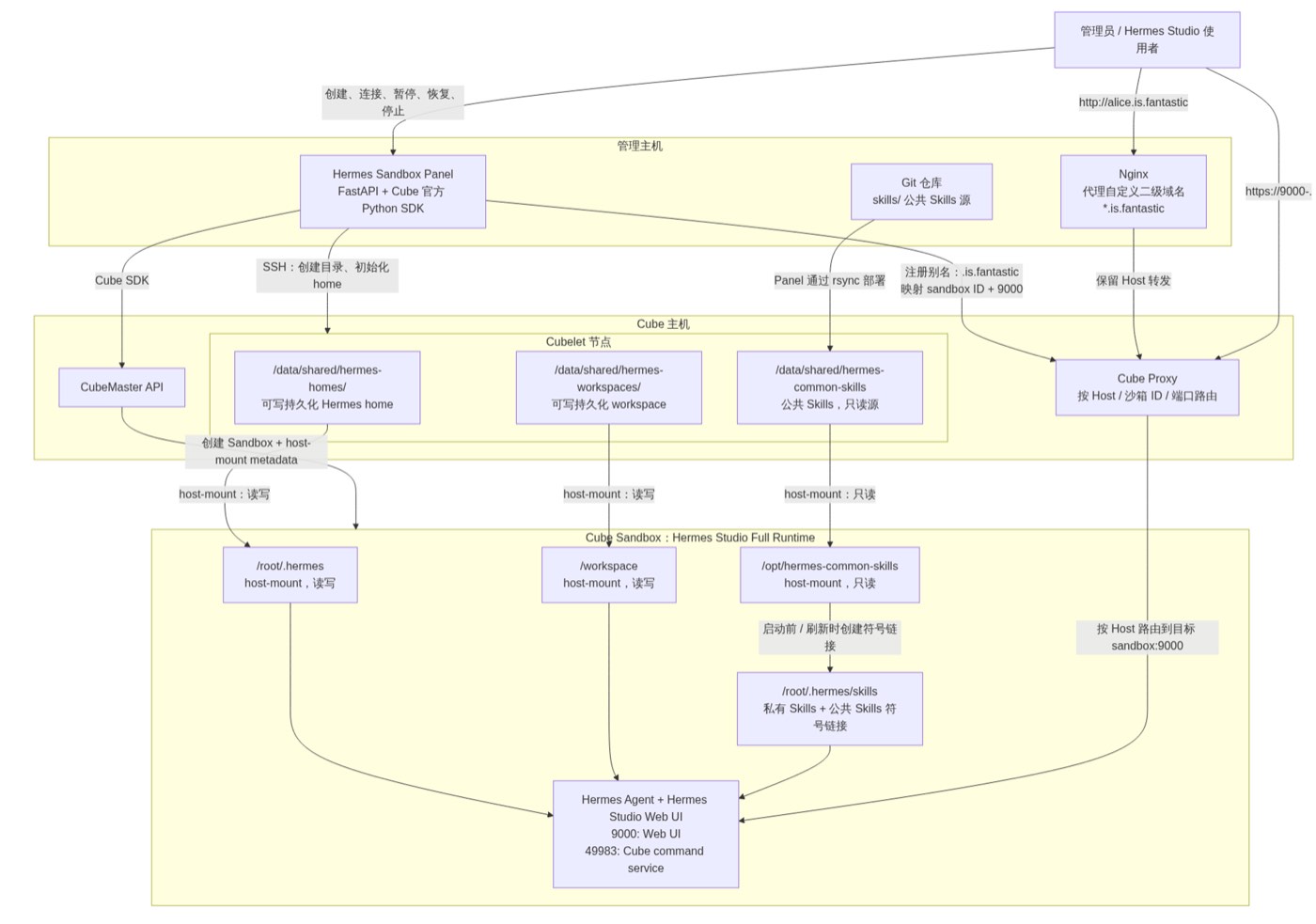
Figure 1: Hermes Studio deployment, persistence, and access architecture on CubeSandbox
From the admin submitting a creation request to Hermes Studio becoming externally accessible, the complete flow can be summarized in ten steps:
- The admin creates or manages sandboxes via the locally-running Hermes Sandbox Panel. The panel is a single-admin internal tool responsible for form interaction, config loading, Cube SDK calls, and status/access URL display.
- The creation request specifies three core elements: home-id corresponds to a persistent Hermes home; workspace-id corresponds to a persistent project workspace; Template uses the verified Hermes Studio Full Runtime template.
- The panel first SSHes into the Cubelet node to ensure the three host-mount directories exist:
/data/shared/hermes-homes/<home-id>,/data/shared/hermes-workspaces/<workspace-id>, and/data/shared/hermes-common-skills. - For a first-used home-id, the panel checks whether
config.yamlexists in the directory. If not, it copies default configuration and runtime content from/data/shared/hermes-homes/default; already-initialized homes are not overwritten. - The panel calls the Cube SDK to create the sandbox, configuring three mount types via
metadata["host-mount"]: Hermes home mapped to/root/.hermes(read-write); project workspace mapped to/workspace(read-write); public Skills mapped to/opt/hermes-common-skills(read-only). - After the new sandbox starts, the panel first initializes the public Skills overlay, then starts Hermes Studio. The repository
skills/is deployed to the Cubelet public directory via rsync; symlinks are created inside the sandbox for public Skills that don't yet exist, with same-named private Skills taking priority. - The panel starts hermes-web-ui, reads the Web UI token, and composes the accessible Hermes Studio URL. The template exposes two key ports: 9000 (Web UI) and 49983 (Cube command service).
- The panel checks Hermes Web UI and
49983/health. On health check failure, the sandbox is not automatically destroyed, so the admin can continue connecting for diagnosis, or perform pause, resume, and stop. - When creating a new sandbox with the same home-id and workspace-id later, the same Cubelet directories are re-mounted, and Hermes config, conversations, private Skills, and workspace files are preserved across instances. Public Skill content updates are immediately visible to already-mounted sandboxes; new Skill directories require a "refresh public Skills" to create new symlinks.
- When starting Hermes Studio, the panel merges default environment variables with creation-time overrides; page display and error output are redacted by KEY, TOKEN, SECRET, PASSWORD, API_KEY rules to avoid exposing sensitive values in the management interface.
The project is currently in internal beta: dozens of Hermes sandboxes on a single CubeSandbox node, running for about a month. Several engineering issues arose during this period, all of which have been diagnosed and resolved, as described below.
2. Persistence Design: Pitfalls When Switching to host-mount
After sandbox rebuild, Hermes Agent's runtime state needs to be recoverable. The most critical things to persist are /root/.hermes (config, runtime files, conversations, and private Skills) and /workspace (project files and task workspace).
Following the conventional E2B-style SDK usage, our team initially tried mounting persistent directories via Sandbox.create()'s volume_mounts parameter, but the Cube version at the time (pre-v0.6.0) didn't yet support volume_mounts. On official recommendation, we switched to the host-mount approach.
Our verification path was progressively narrowed: first confirm that sandbox creation requests support passing through metadata; then verify that metadata["host-mount"] can carry multiple mount descriptors (hostPath, mountPath, readOnly); then do a minimal experiment — the first sandbox writes a marker file to the mounted /root/.hermes, and the second new sandbox mounts the same host directory and successfully reads it, confirming the mount type is virtiofs read-write; finally expand the minimal approach to three mount types: persistent home, persistent workspace, and read-only shared public Skills.
Seven pitfalls were encountered in this process, with the first four about mounting itself:
- hostPath is not the path on the machine running the management panel. It must point to the Cubelet node that actually hosts the sandbox. Mistaking it for the path on the host running the FastAPI panel process will cause the mount to not find the expected data.
- The target directory must pre-exist. Even with correct mount descriptors, if the target directory is missing on the Cubelet node, CubeMaster will error during creation.
Therefore, the current flow first creates home, workspace, and public Skills directories via SSH before calling the Cube SDK.
- An empty directory will shadow the image's
/root/.hermes. Mounting is not directory merging — an empty host directory will mask the image's pre-installedconfig.yaml, Agent runtime files, and Skills. This is the most critical runtime issue. - You must seed first, then formally mount. Early on, a temporary seed sandbox was used to copy
/root/.hermesfrom the image to the host directory; currently, a default home is固化 on the Cubelet, usingconfig.yamlexistence to determine whether initialization is needed, avoiding repeated overwriting of user conversations and private config. /root/.hermesand/workspaceshould not share a directory. Hermes home belongs to Agent runtime state and user config, while workspace belongs to project files. Separating them reduces coupling between conversations, Skills, and business code.- Public Skills should not be directly copied to each home. Copying one by one causes replica bloat, update desync, and may overwrite private modifications — this directly leads to the layering design in the next section.
- Old sandboxes cannot dynamically add new mounts. Public Skills was a third mount type added later. Old sandboxes created without this mount cannot补上 it with just a "refresh Skills"; they must be rebuilt with the mount added to the creation parameters.
3. Skills Layering: Read-Only Public Directory + Symlink Overlay
This design must simultaneously satisfy two contradictory requirements: public Skills must be usable and updatable across multiple Cube sandboxes; and individual or project-customized Skills already in each Hermes home must not be destroyed.
Direct copying encounters four problems: each home retains a copy, requiring one-by-one sync when public Skills update; difficulty distinguishing public versions from user-modified private versions; sync easily overwrites private modifications; deleting or upgrading public Skills may误删 private files in homes.
The final data flow is:
The public directory maintains a single copy, auditable via Git with version management; mounted read-only into sandboxes, so a single Agent or user cannot误改 global capabilities. Since Hermes Agent loads Skills from /root/.hermes/skills by default, the panel creates symlinks in that directory pointing to /opt/hermes-common-skills/<skill-name>.
| Content | Cubelet Directory | Sandbox Path | Permission |
|---|---|---|---|
| Hermes home | /data/shared/hermes-homes/<home-id> | /root/.hermes | read-write |
| Workspace | /data/shared/hermes-workspaces/<workspace-id> | /workspace | read-write |
| Public Skills | /data/shared/hermes-common-skills | /opt/hermes-common-skills | read-only |
The override rule is simple: if /root/.hermes/skills/<name> already exists, it's treated as a private Skill, and no same-named public symlink is created — private version takes priority. The reason for not directly mounting the public directory to /root/.hermes/skills is that the mount would shadow private Skills already in home.
Shared host-mount lets already-mounted sandboxes directly see public Skill content updates; if a new Skill directory is added, a refresh is still needed to create new symlinks for that directory.
4. Network Rules and Image Building
4.1 LAN Model Access Failure: Outbound Rules Need Separate Allowlisting
During operation, we encountered a problem: Hermes Studio and the Agent both started normally in the Cube sandbox, and the Web UI opened — but as soon as a model call was made, a Connection error occurred. Investigation revealed: when the model service is deployed at LAN addresses like 10.10.x.x, --allow-internet-access only governs public internet access, not internal network service access — these are two completely different outbound rules.
We first did a TCP check in the sandbox, confirming it was a network-layer issue rather than application-layer:
Then we recreated the Template, explicitly adding IPv4 outbound CIDR:
--allow-out-cidr 0.0.0.0/0 is the real switch for allowing the sandbox to make outbound IPv4 access, covering the current LAN model service address. After allowlisting, the TCP connection from sandbox to model service was restored, and a /v1/models request returned 401 Invalid token — the network path was now open, the previous Connection error was gone, only the test request lacked the model API token.
4.2 AppleDouble Files: Cleaning macOS Metadata Before Building Cube Images
Hermes Agent source code needs to enter the Cube Template's corresponding image. Our build chain is: macOS dev machine → package source → upload to Cube build machine → Docker build template image → Cube sandbox run Agent.
Initially, when packaging from macOS, ._* AppleDouble metadata files were mixed into the source. They don't block image building or sandbox startup, but Hermes Agent may read them as UTF-8 text when scanning source code, triggering decoding errors.
The final fix was not in sandbox runtime logic, but in the Cube image build context preparation stage:
COPYFILE_DISABLE=1 minimizes macOS generating AppleDouble files; two --exclude flags ensure that even if these files already exist in the directory, they won't be packaged into the upload. After image building, you can verify in the sandbox, expecting 0 results.
5. TAP Device EBUSY Issue During Pause/Resume in v0.5.1
We configured 15-minute auto-pause for Hermes sandboxes to save resources. After some instances entered paused state, the control plane restarted CubeMaster, Cubelet, and network-agent. But when subsequently accessing these instances, resume failed — CubeMaster reported "Device or resource busy."
Initial diagnosis: the virtual NIC recorded in the pause snapshot didn't properly coordinate with the persistent TAP NIC state retained or initialized by network-agent after the control plane restart. During resume, the system repeatedly configured the same TAP device, ultimately triggering EBUSY. Newly created and continuously running sandboxes were unaffected; instances that were paused and then experienced a control plane restart might be inaccessible.
We have submitted Issue #953 to the CubeSandbox team, and official feedback indicates a fix is in progress.
The interim workaround is: preserve the home and workspace persistent directories, destroy and rebuild the unrecoverable sandbox, then rebind the alias. This way user workspace and Hermes config are not lost, but the VM ephemeral layer is reset.
6. Key Conclusions
- Persistence boundaries must be validated before template runtime testing:
/root/.hermesand/workspaceshould be separated to avoid coupling runtime state, user config, and business code. - Empty host directories shadow the image's
/root/.hermes; first-used homes must be initialized (seeded) first. - hostPath points to the Cubelet node hosting the sandbox, not the management panel's host; target directories must exist before sandbox creation.
- Public Skills use a "read-only shared directory + private directory symlink" overlay design, achieving centralized maintenance with private version priority.
- Enabling internet access does not equal LAN model service access; templates must explicitly configure outbound CIDR and verify with TCP/HTTP checks in the sandbox.
- When preparing image build contexts on macOS, exclude AppleDouble (
._*) and.DS_Storeto prevent Agent source scanning errors. - Control plane state should be based on Cube's real-time query results, avoiding drift between panel-maintained state and actual sandbox state.
Q&A Excerpts
Q: Why does the management panel use Cube query results instead of maintaining its own state?
A: To ensure a single source of truth. If the panel maintains sandbox state itself, it will easily drift from Cube's real state over time. The panel only displays Cube's real-time query results, reducing state inconsistency and misoperation.
Q: If you redesigned from scratch, what would you change most?
A: We would clarify "persistence state boundaries" from day one, rather than first validating that the Hermes Studio template runs and then bolting on host-mount persistence. Persistence design directly affects directory initialization, Skills layering, upgrade strategy, and failure recovery — the earlier you validate, the less rework later.
Q: What's the one experience you most want to share with other Cube users?
A: From day one, do a complete rebuild test: create a brand new sandbox, confirm the Agent can get the correct state, access needed networks, and not leak or overwrite data that shouldn't be shared. Only when "still correct after rebuild" can you say the persistence boundaries, network rules, and permission design truly hold.
Thanks to Chen Jinbo and the AI team at Shanghai Yangpu New Energy Technology for their contributions to this content.